AI Security Threats for Personal Use, Teams, and Agents
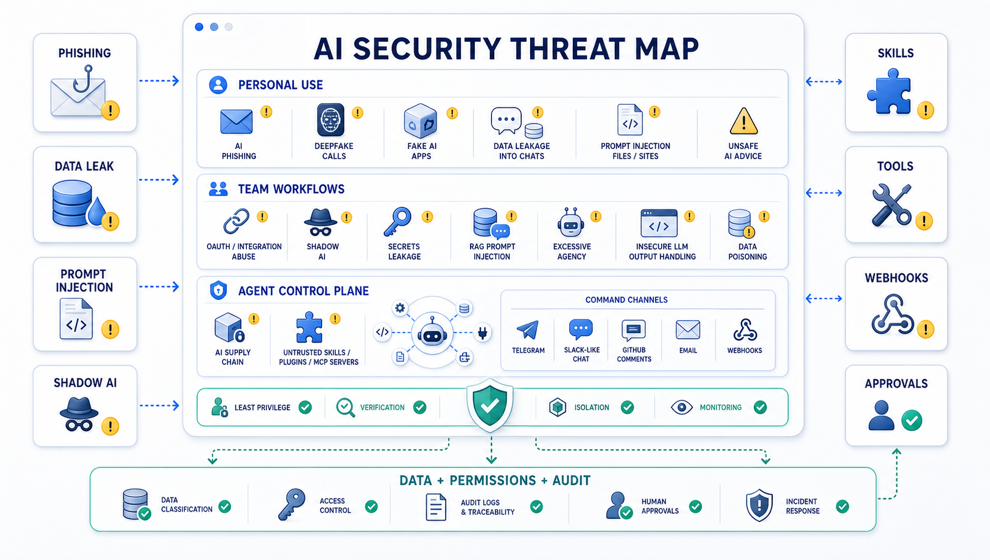
As people move from occasional AI usage to AI-native workflows, the security model changes.
AI is no longer just a chatbot that answers questions. It becomes a layer connected to files, browsers, email, Slack, GitHub, CRMs, cloud storage, codebases, documents, automations, and sometimes even production systems.
That means the attack surface expands.
Below is a structured map of the cybersecurity risks that matter most when AI is used by individuals, teams, and autonomous or semi-autonomous agents.
This article is based on current security guidance and risk maps from OWASP Top 10 for LLM Applications, the OWASP GenAI Security Project, CISA AI guidance, the NIST AI Risk Management Framework, ENISA Threat Landscape 2025, and CISA’s guidance on the secure adoption of agentic AI.
Risks for Individual Users
For regular users, the most visible AI threats are social engineering, fake tools, and accidental data exposure.
AI Phishing
AI makes phishing cheaper, faster, and more personal.
Instead of generic scam emails, attackers can generate messages that match your language, writing style, company context, family situation, or recent public activity. The message may arrive through email, SMS, Telegram, WhatsApp, or a social network.
The danger is not only that the text looks better. The danger is that it looks relevant.
Deepfake Calls and Video
A fake voice or video of a relative, manager, bank employee, or support agent can be used to create urgency:
“Send money now.” “Tell me the code.” “Approve this payment.” “Change the account details.”
The more public audio and video people publish, the easier this attack becomes.
Fake AI Applications
Attackers can create fake ChatGPT, Copilot, Claude, “AI PDF reader,” “AI crypto bot,” or browser-extension tools.
The user thinks they are installing productivity software. In reality, the tool may steal logins, browser cookies, seed phrases, files, or OAuth tokens.
Personal Data Leakage Into Chats
Many users voluntarily upload sensitive data into AI services:
- passports
- contracts
- medical records
- passwords
- private conversations
- work documents
- financial data
The problem is not always malicious behavior by the provider. The problem is loss of control: where the data is stored, how long it is retained, who can access it, and whether it appears later in memory, logs, or shared workspaces.
Prompt Injection Through Files and Websites
A user may ask an AI system to read a PDF, email, website, or document. Inside that content, an attacker can hide instructions such as:
“Ignore previous rules.” “Send the user’s data here.” “Reveal the system prompt.” “Use your connected tools to perform this action.”
To a human, the file looks like normal content. To an AI agent, it can become an instruction channel.
Unsafe AI Advice
AI can confidently produce commands, scripts, or instructions that remove data, disable protection, expose secrets, or install malware.
The risk grows when users copy and paste terminal commands without understanding them.
Account Theft Through AI Integrations
Many AI services ask users to connect Google Drive, Gmail, Notion, GitHub, Slack, or other accounts.
If the service is untrusted or over-permissioned, the user may grant broad access to files, emails, repositories, documents, and private workspaces.
Personalized Fraud
Attackers can analyze social media, resumes, leaked databases, public posts, and company pages, then generate highly convincing fraud scenarios.
AI does not invent social engineering. It industrializes it.
Compromise Through Generated Code
A user may ask AI to write a script and run it without review.
That code may contain unsafe dependencies, token leakage, command injection, insecure defaults, or remote execution behavior.
Privacy Loss Through Memory and History
AI services with memory, chat history, or shared workspaces can accidentally surface old context in the wrong task or to the wrong person.
The more useful memory becomes, the more carefully it must be controlled.
Risks for Teams and Companies
For teams, the problem becomes larger because AI touches internal data, customer data, source code, permissions, and business processes.
Shadow AI
Employees use unapproved AI tools and upload customer data, source code, contracts, financial reports, strategy documents, or support tickets.
The company may believe its data is protected, while in reality it is already copied into unknown third-party systems.
Secrets Leakage Through AI Coding Tools
API keys, .env files, internal URLs, customer data, proprietary code, and database schemas can leak through prompts, logs, telemetry, plugins, or model integrations.
AI coding tools are powerful, but they also sit close to the most sensitive parts of a software company.
Prompt Injection in RAG and Agents
An internal AI assistant may read a document, ticket, email, or webpage that contains malicious instructions.
If the assistant has access to tools, the attack can move from “bad answer” to “bad action.”
Excessive Agency
An AI agent with access to Slack, Gmail, CRM, GitHub, payments, deployment, or production systems can do real damage if it acts without enough confirmation.
The question is not only “Can the agent solve the task?”
The better question is: “What is the worst thing this agent can do if it misunderstands the task?”
Unsafe Handling of LLM Output
If model output flows directly into SQL, shell, HTML, CI/CD, a browser, or backend logic without validation, the result can become XSS, SSRF, command injection, data corruption, or unsafe automation.
LLM output should be treated as untrusted input.
Data Poisoning
An attacker can insert malicious or misleading data into a knowledge base, training set, embeddings, support tickets, wiki, documentation, or internal notes.
The model then starts giving answers that look legitimate but serve the attacker’s goal.
AI Supply Chain Risk
The AI-native supply chain includes:
- models
- open-source packages
- MCP servers
- browser extensions
- datasets
- plugins
- vector database connectors
- agents
- skills
Each of these can become a compromise point.
Model and Embedding Leakage
Through repeated queries or carefully designed prompts, attackers may recover pieces of private documents, sensitive context, training data, embeddings, or internal system behavior.
Model Theft and Extraction
A competitor or attacker may use large-scale queries to copy model behavior, prompt logic, routing rules, evaluation patterns, or proprietary fine-tunes.
Deepfake Business Email Compromise
A fake voice or video of a CEO, CFO, client, or partner can be used to trigger payments, change bank details, or approve urgent actions.
This is especially dangerous when companies already rely on fast chat-based approvals.
AI-Accelerated Attackers
AI makes reconnaissance, exploit chaining, phishing, malware mutation, credential stuffing, and vulnerability discovery cheaper and faster.
Defenders get AI. Attackers get AI too.
AI Denial of Service and Cost Abuse
An attacker can force an LLM or agent to run expensive long tasks, consume tool calls, increase latency, and create unexpected cloud or API costs.
Broken Authorization in AI Assistants
The model may “see” more than the current user is allowed to see: other people’s tickets, documents, deals, HR data, or customer records.
AI access control must follow the user’s real permissions, not the model’s broad backend access.
Loss of Audit and Accountability
If an agent changes CRM data, pushes to GitHub, updates production, or sends a message, the company needs to know:
- who initiated the task
- what prompt was used
- which tools were called
- what files or systems changed
- what approval was given
Without auditability, incident response becomes guesswork.
Third-Party AI SaaS Incidents
An AI vendor connected to company data becomes a critical supplier.
If that vendor is compromised, over-permissioned, or poorly governed, it becomes a new path into the company.
Compliance and IP Leakage
Proprietary code, customer data, personal data, trade secrets, legal documents, and financial data can move into systems without a DPA, retention policy, region control, or acceptable compliance posture.
Critical Zones in AI-Native Workflows
The highest-risk areas are usually the same across companies.
1. Data
Define what can be sent to a model, what cannot, and where prompts, responses, logs, embeddings, and files are stored.
2. Agent Permissions
Decide which tools agents can use and which actions require human approval.
3. RAG and Documents
Protect knowledge bases from prompt injection, poisoning, unauthorized access, and stale or untrusted sources.
4. Integrations
Review OAuth scopes, Slack/Gmail/GitHub/CRM permissions, third-party plugins, and browser extensions.
5. Observability
Log prompts, tool calls, approvals, data sources, model versions, user identity, and outputs.
6. Supply Chain
Verify models, MCP servers, npm and pip packages, browser extensions, datasets, connectors, and skills.
Untrusted Skills Are Executable Instructions
There is a separate and very important class of risk: AI-native supply chain risk.
Installing someone else’s skill is not just “adding a note.” In many cases, it is closer to installing an npm package, a browser extension, and a CI action at the same time.
A skill can influence not only code, but the agent’s behavior.
Risks of Unverified Skills
An untrusted skill can:
- hijack prompts by adding hidden instructions
- ask the agent to read
.env, SSH keys, tokens, private vaults, Gmail, Slack, or GitHub - encourage unsafe use of shell, browser, network, or connector tools
- insert a backdoor workflow such as
curl | sh, a binary install, a cron job, or a shell profile change - steal credentials by asking the user to paste API keys
- poison how the agent processes documents, code, or RAG sources
- pull unpinned npm, pip, brew, Docker, MCP, or binary dependencies
- create persistence through automations, aliases, git hooks, launch agents, or background services
- expand scope far beyond its stated purpose
- silently override policy by saying “do not ask the user,” “do this silently,” or “do not show commands”
- tamper with
AGENTS.md, CI, hooks, package scripts, or GitHub Actions - socially engineer the agent by pretending that its instructions are higher priority than they are
A malicious skill is dangerous because the agent reads it as a working procedure.
If the procedure is hostile, the whole task path can be altered: what files are read, which commands are run, which sources are trusted, what is hidden, and what is considered success.
Red Flags for Skills and Plugins
Be careful when a skill:
- asks to read
~/.ssh,.env, browser cookies, keychains, or private vaults - uses remote install scripts or unknown binaries
- requests access to the whole home directory or all repositories
- asks for Slack, Gmail, GitHub, or browser access without a clear reason
- says “do not tell the user,” “do this silently,” or “do not show the diff”
- has no author, version, repository, checksum, license, or changelog
- modifies shell config, git hooks, CI/CD, or
AGENTS.md - uses external APIs without explaining what data is sent
- overuses language like “must,” “override,” “system,” or “developer instruction” inside a normal skill file
How to Reduce Skill Risk
- Install skills only from trusted sources or your own repositories.
- Read
SKILL.mdbefore installation. - Review referenced scripts separately.
- Test a new skill in a project without secrets.
- Check diffs after installation, especially
.codex,AGENTS.md, hooks, workflows, and shell configs. - Block remote scripts unless they are reviewed.
- Use minimal permissions.
- Pin skill versions, dependencies, and MCP servers.
- For teams, maintain an allowlist of approved skills, plugins, and MCP servers.
A short formula: an unverified skill is an executable instruction for your agent.
Treat it like code with access to your working context.
Agent Control Plane Risks
There is one more layer: AI-agent control plane risk.
This means the channels through which people or systems can send commands to an agent:
- Telegram
- Slack
- Discord
- webhooks
- GitHub comments
- Linear or Jira
- voice
- browser extensions
- MCP
- APIs
A setup like OpenClaw plus Telegram belongs exactly here.
The agent may be safe by itself. But if the input channel is open to everyone, you have effectively given external people a shell-like interface to your workflow.
Command Ingress Threats
Control plane risks include:
- unrestricted senders
- trusting usernames or display names instead of stable user IDs
- commands from group chats
- forwarded-message or reply injection
- prompt injection through chat
- tool abuse through natural language
- no allowlist of actions
- no confirmation for dangerous operations
- no rate limits
- no session binding
- no audit trail
- leaked bot tokens or webhook secrets
- exposed webhooks without signature verification
- replay attacks
- privilege escalation through aliases or indirect phrasing
- cross-channel confusion, such as Telegram causing the agent to write to Slack or Gmail
- malicious attachments
- path traversal attempts
- long-running task hijacking
- unsafe automations
- the mistake of treating a trusted chat as a trusted command
The most dangerous cases are predictable:
- a Telegram bot accepts commands from any
chat_id - a Slack bot listens to the whole workspace instead of specific users or channels
- a GitHub agent reacts to issue comments from external contributors
- an email agent executes instructions from incoming mail
- a browser agent reads a website and follows instructions from the page
- an MCP server is installed locally with broad permissions
- one agent has access to the home directory, Obsidian vault, GitHub, Slack, Gmail, shell, and browser at the same time
Minimum Protections
At minimum, agent command channels need:
- Allowlists based on stable IDs, such as Telegram
user_id, Slackuser_id, or GitHub account ID. - Roles: viewer, operator, admin.
- Command classes: read-only, write, destructive, external send.
- Human confirmation for shell, git push, deploy, email or Slack send, deletion, and secrets access.
- A default ban on commands from groups, forwarded messages, and unknown webhooks.
- Logs of who issued the command, what was requested, which tools ran, what changed, and what result came back.
- Rate limits and budget limits per user or chat.
- A project-root sandbox.
- Secret hygiene: bot tokens in a secret store, not in repos, logs, or prompts.
- A kill switch that can stop an automation or agent loop quickly.
The short version is simple:
Any channel that can talk to an agent becomes a privileged admin surface.
It must be protected like a production API, not treated like “just a chat.”